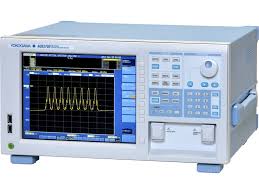
Yokogawa AQ6370D optical spectrum analyzer repair
.png)
The AQ6370D is the instrument a lot of telecom and photonics labs cannot afford to be without for long. When it goes down, we get it back fast, at the component level, with calibration included.
The Yokogawa AQ6370D sits between the AQ6370C and the current AQ6370E in the AQ6370 series, and it is still one of the most widely deployed telecom-class optical spectrum analyzers in production labs and R&D environments worldwide. The free-space input design covers 600 to 1700nm on a single instrument, handles both DWDM-class single-mode and VCSEL-sourced multimode fiber without swapping input optics, and delivers 78dB typical dynamic range with 0.02nm minimum resolution bandwidth. The AQ6370D added data logging, gate sampling, resolution calibration, and an enhanced auto-sweep mode over the C revision, which is why a lot of production and characterization environments still run it.
It is a precision monochromator instrument. The measurement accuracy depends on the mechanical and optical condition of the internal monochromator, the alignment of the free-space input path, and the integrity of the reference source used for wavelength calibration. All of those degrade over time and use. When they do, the instrument does not always fail outright. It just measures wrong, which is worse.
Yokogawa factory service handles AQ6370D repairs. Lead times are typically weeks. For instruments running production test or sitting at the center of an R&D measurement stack, that timeline is not workable. We complete most repairs in 1 to 3 business days at the component level. Not module swap, not return-to-factory.
What Breaks on the AQ6370D
FC/APC input connector wear is the most common fault on this instrument. The free-space input is built around a precision FC/APC interface, and repeated fiber mating cycles wear the alignment sleeve. The symptoms are erratic power readings, elevated insertion loss on known-good fiber, or complete loss of optical coupling at the input. We rebuild or replace the connector interface and verify coupling performance before the unit ships.
Wavelength calibration drift shows up when the built-in reference source degrades or the internal optical alignment routine loses accuracy. The AQ6370D has an auto-alignment function that uses the built-in source to correct the monochromator optical path. When that source weakens or the alignment reference drifts, the instrument calibrates itself to a bad baseline. The symptom is wavelength offset errors that are consistent and repeatable across sweeps.
Sweep mechanism degradation comes in as slow sweep initialization, timeout errors on startup, or failures during the auto-alignment routine. The monochromator drive on the AQ6370D has a service life, and units in continuous production sweep loops get there faster than instruments used intermittently in a lab.
LAN port failure after voltage transients pulls AQ6370D units out of automated test service even when the optical measurement hardware is fully functional. GPIB and USB interfaces fail less often but we test all three on every unit.
Optical path contamination from dirty fiber connections on the input produces stray light artifacts in the measured spectrum, raises the noise floor, and degrades close-in dynamic range. It is one of the most common causes of dynamic range complaints on units that are otherwise mechanically sound.
Cooling fan failure in production environments leads to thermal shutdowns. The AQ6370D's protection circuit trips, the unit shuts down, and repeated thermal cycling accelerates aging on internal electronics over time.
Display faults, including backlight degradation and partial screen non-responsiveness, show up on older high-use units. The AQ6370D uses a front panel display with mouse and keyboard support; display issues do not affect measurement accuracy but make the instrument harder to use without remote control.
How We Work
Every AQ6370D that comes in gets a full diagnostic first. DFB reference sources at 1310 and 1550nm, sweep speed verification, dynamic range measurement, resolution bandwidth check, and GPIB, LAN, and USB communication testing. That baseline tells us exactly what is wrong before we give you a quote.
All work is component level. Worn connectors get rebuilt. Failed drive components get replaced, not masked with an assembly swap. The built-in wavelength reference source and internal optical alignment are verified after any monochromator or input path work. NIST-traceable calibration with a certificate ships with every completed unit, along with a test report showing pre-repair and post-repair measurements.
Service Specifications:
| Parameter | Value |
|---|---|
| Wavelength Range | 600nm to 1700nm |
| Resolution Bandwidth | 0.02nm minimum |
| Wavelength Accuracy | ±0.01nm |
| Close-in Dynamic Range | 78dB typical |
| Level Range | +20 to -90dBm |
| Sensitivity | -90dBm (1300 to 1620nm, HIGH3 mode) |
| Sweep Speed | 0.2 sec / 100nm span |
| Sampling Points | 50,001 max |
| Interface | GPIB, LAN, USB |
| Input | FC/APC free-space input |
Service specifications
| Parameter | Value |
|---|---|
| Wavelength range | 600 nm to 1700 nm |
| Resolution bandwidth | 0.02 nm minimum |
| Dynamic range | > 78 dB |
| Interface | GPIB, LAN, USB |
Frequently asked questions
My AQ6370D has wavelength offset errors. Is that a calibration issue or a hardware fault?
How is the AQ6370D different from the AQ6370C and AQ6370E?
Documents
Also in inventory - buy a tested unit
We also sell refurbished Yokogawa AQ6370D units that have been verified and are ready to ship.